
Contents:
- What Is Google Ads?
How Does It Work?
Why Your Restaurant Needs It - Introducing Google Ads Boost
Understanding Direction Clicks
Why Choose Google Ads Boost - Upgrading to Google Ads Boost
- What to Expect After Upgrading
Your Monthly Report - How Google Ads Work Alongside SEO
What Is Google Ads?
Google Ads is Google's online advertising platform. It lets you promote your restaurant through paid ads, reaching potential guests while they're deciding where to eat.
Think of a Google Ad as a digital sign aimed at people already looking for what you serve. While your storefront sign relies on someone walking past your door, a Google Ad can reach diners searching online—ready to eat out and deciding where to spend their money. Appearing at that moment gives your restaurant a chance to become their next stop, even if they've never heard of you before.
How Does It Work?
Your advertising runs through a campaign, set up around a goal, such as encouraging people to request directions to your restaurant. Your campaign is built around what your restaurant offers, the area you serve, and the diners you want to reach, helping your ads appear for relevant local searches.
For example, someone searching for "Italian restaurants near me" could see an ad for your Italian restaurant labeled Sponsored at the top of the search results.
Other restaurants may be trying to appear for that same search. To decide which ads appear and where, Google runs a split-second ad auction. It considers factors such as the person's search and location, along with the quality and relevance of each ad.
This gives an independent restaurant an opportunity to compete for attention alongside larger chains. A campaign that closely matches what a diner is looking for can help your restaurant get noticed, even when more familiar names are advertising nearby.
Why Your Restaurant Needs It
- 🍽️ Get considered before dinner plans are made. A lunch break, a weekend outing, or a last-minute dinner decision can start with a Google search. Ads give your restaurant an opportunity to join that decision while the person is still choosing.
- ⚡ Start gaining visibility sooner. A new restaurant or updated concept needs attention while its reputation grows. Once your campaign is live, ads can begin reaching potential guests while you continue building your presence in unpaid search results.
- 📍 Put your advertising budget toward relevant local interest. Location targeting helps focus your advertising on people in or interested in your area—including visitors who haven't discovered the local dining scene yet.
- 💡 Become a familiar name for the next occasion. Someone may see your ad today and choose you another time. Continued exposure builds recognition!
Introducing SpotHopper's Google Ads Boost
Google Ads Boost is a SpotHopper feature that provides a managed Google Ads campaign for your restaurant. Our Ads team creates and runs ads for relevant local searches, with a focus on generating direction clicks to your business.
✨ Google Ads Boost is built for busy restaurant owners—no advertising experience or knowledge of Google’s tools required.
Understanding Direction Clicks
A direction click happens when someone chooses to get directions on Google to see how to reach your restaurant. This will open directions to your location, where they can check the route and estimated travel time—helping them take the next step toward visiting.
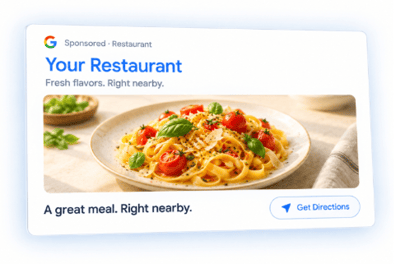
This is a meaningful sign of interest: the person has moved from discovering your restaurant to finding out how to get there. For Google Ads Boost, the direction requests associated with your campaign are tracked as part of its results.
⚠️ Direction clicks indicate interest in visiting, but they don't confirm a completed visit or purchase.
Why Choose Google Ads Boost?
- 🎯 Pay for results, not impressions. An impression simply means your ad was displayed. With your Boost plan you actually pay for a guaranteed number of direction clicks per month.
- 🙌 We create and launch your campaign. Our Ads team prepares ads for searches and handles the technical setup, so you can focus on running your restaurant.
- 🔄 We keep managing it after launch. The team monitors campaign performance and makes ongoing adjustments focused on generating direction clicks. You won't need to check results daily or figure out which settings to change.
- 📊 You can see what your campaign delivers. Monthly reports show direction clicks, other customer actions, and the searches that helped people discover your restaurant.
Upgrading to Google Ads Boost
If your SpotHopper account doesn't already include Google Ads, you can upgrade directly from your dashboard if your account is eligible.
Select Explore next to Google Ads Boost in the left navigation menu. Alternatively, go to Google & Reviews and select Explore Google Ads in the banner at the top of the page.

You'll see the plans available for your restaurant. Review the details, then select the button beneath your preferred plan to continue with the upgrade.
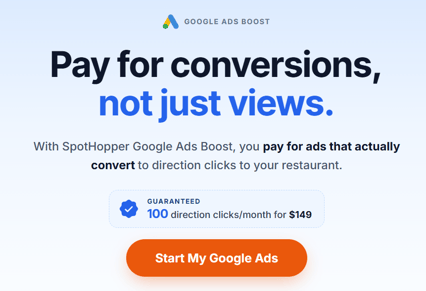
Once your upgrade is complete, the Explore option and upgrade banner will no longer appear.
⚠️ Please note: Google Ads Boost requires SpotHopper's Google Integration feature and a successfully connected Google Business Profile. Available plans are based on your profile's activity to match the campaign's goal to your restaurant's potential, so not every connected account will see an upgrade option.
What to Expect After Upgrading
Upon upgrading, SpotHopper’s Ads team is notified and begins working on your campaign. Setup typically takes around two weeks, and there’s nothing you need to do during this time.
Your Monthly Report
After launch, our team tracks how potential guests interact with your ads and uses those insights to refine your campaign. You'll be able to follow its results through a monthly campaign report.
Your first report will be available after your campaign has run for a full calendar month and the report has been prepared.
How to View Your Report
- Select Google & Reviews from the left navigation menu.
- Select View Report in the banner announcing that your monthly Google Ads Boost report is ready.
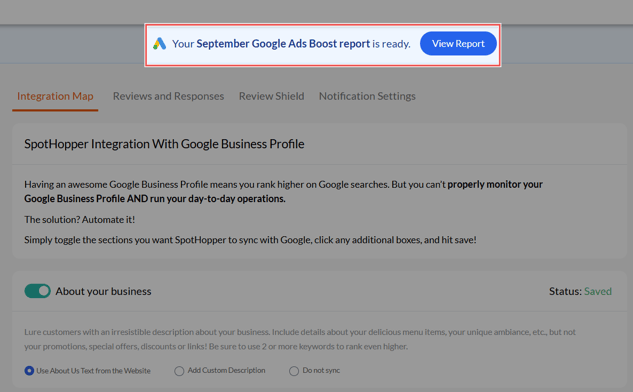
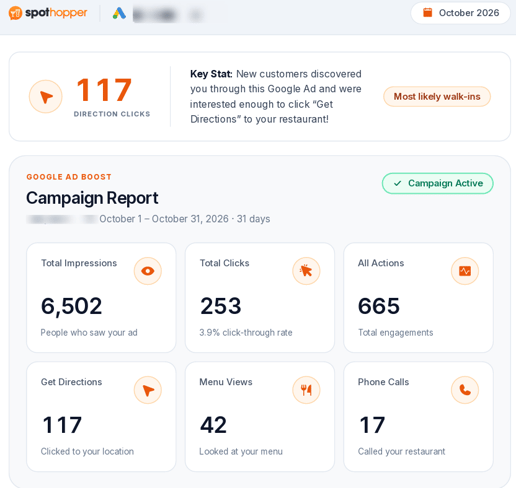
Your report shows the direction clicks delivered against your plan's target, along with information about your campaign's visibility and customer engagement.
How People Found You
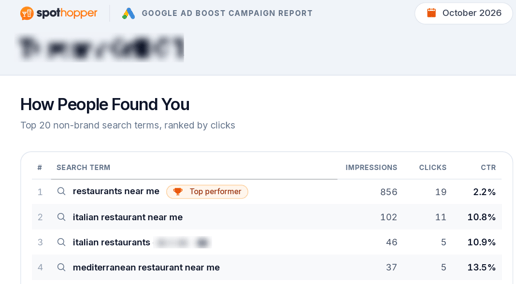
The first page shows the searches that led people to your ads without searching for your restaurant by name. The terms are ranked by clicks, helping you see which searches generated the most engagement.
You'll also see CTR, or click-through rate—the percentage of ad appearances that resulted in a click.
Campaign Performance & Customer Actions
The second page brings your main campaign results together:
- Impressions: How many times your ads appeared.
- Clicks: How many times people clicked your ads.
- Customer actions: Recorded engagement, including direction requests, menu views, and phone interactions.
These figures help you understand both how much exposure your campaign received and what people did after discovering your restaurant.
How Google Ads Work Alongside SEO
SEO—search engine optimization—helps people find your restaurant through unpaid search results. Google Ads adds paid visibility, giving potential guests more opportunities to discover your business while your online presence grows.
That exposure can build familiarity with your restaurant's name. Someone who first notices you in an ad may remember you and search for your restaurant later. Your campaign report also reveals what diners are searching for, providing insights that can help you create useful, relevant content for your website.
⚠️ Running Google Ads doesn't improve your unpaid search rankings. It indirectly supports your SEO efforts by increasing your restaurant's visibility and building recognition among potential guests.