
Contents:
- WATCH: How Restaurants Appear Higher in Google Local Listing Searches
- Overview
- Setting Up and Optimizing the Integration Map
About Your Business
Find a Table Link
Photos & Videos
Hours
Menus
Attributes
WATCH: How Restaurants Appear Higher in Google Local Listing Searches
Overview
Once your Google Business Profile (GBP) is connected to SpotHopper (see Connect Your Google Business Profile to SpotHopper for setup steps), you’ll unlock a powerful integration tool.
The Integration Map acts as a bridge between your SpotHopper site and your Google Business Profile. Once it’s set up, any changes you make in SpotHopper—like updating menus or adding new photos—sync directly to Google in real time.
This keeps your information consistent across both platforms, ensuring your GBP is always up to date, your guests stay informed, and your restaurant appears more often in local searches.
Nationwide, SpotHopper analyzed over 1,000 restaurants that use SpotHopper's Google integration and over 1,000 that don’t. On average, businesses that use the integration receive 500 additional website visits per month.
Even if just 10% of those visitors become customers, that’s 50 new guests each month. With an average check of $100, that’s an extra $5,000 in monthly revenue driven by this single feature.
Setting Up the Integration Map
To set up your integration map, navigate to the "Google & Reviews" page in SpotHopper. You will immediately land on the "Integration Map" tab.
-png-1.png?width=670&height=102&name=annotely_image%20(26)-png-1.png)
You’ll see sections for everything you can sync — including About Us, Hours, Menus, Photos, Attributes, and more.
From here, you can toggle each category on or off, click any additional boxes, and hit the Save button. Each section has its designated "Save" button and need to be saved separately.
-png-1.png?width=588&height=299&name=annotely_image%20(27)-png-1.png)
Changes made in the Integration Map may take up to 20 minutes to appear on your Google Business Profile.
About Your Business
Under the About Your Business section, you can choose to either sync the About Us text from the website or add a custom description.
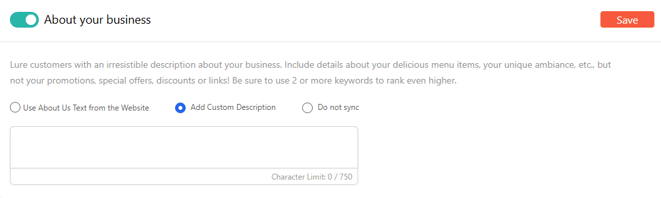
Make sure the "About Your Business" info is accurate and keyword-rich. A detailed description helps Google understand your restaurant type and boosts your visibility in “near me” and category-based searches.
⚠️Your description may not be updated if it does not comply with Google Business Profile policies.
Find a Table Link
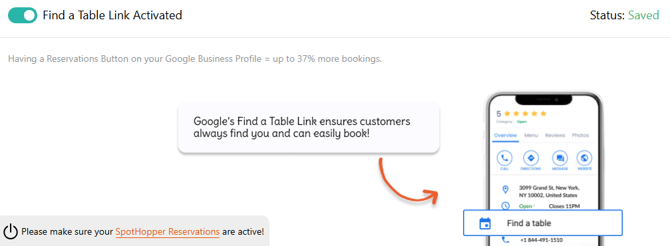
If you are using SpotHopper's reservations system, you can enable this option and add the reservation link to your Google Business Profile.
Photos & Videos
When this section is turned on, your website images will automatically sync to your Google Business Profile, keeping your visuals fresh and consistent everywhere.
You also have the option to add your video link, which will enrich your listing and can help increase engagement.
Restaurants with frequent, high-quality photo updates receive up to 35% more clicks on their GBP listings.
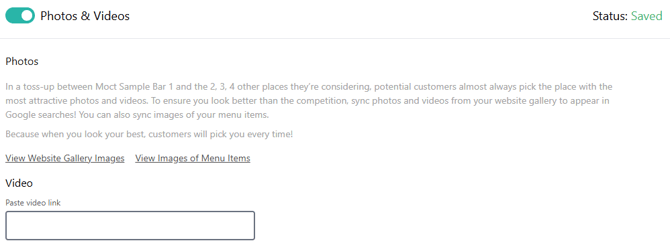
To update the images shown on your website gallery and GBP, just go to Website → Photo Gallery and click the images you wish to add. The images with checkmarks are the ones that will show.
-png-1.png?width=670&height=270&name=annotely_image%20(28)-png-1.png)
Hours
The hours section sends your operating hours to Google. 
Unlike with the the other sections, ths one doesn’t sync instantly as Google reserves the right to review and change your working hours at any time. Even if you update them manually on your GBP, Google can revert the changes if they find conflicting information on other sites (like social media, ordering, or reservation pages) or if multiple users suggest different hours.
To prevent this, make sure your hours are consistent across all platforms.
Menus
SpotHopper automatically syncs your menu and menu photos directly from your website to your GBP, when this section is on.
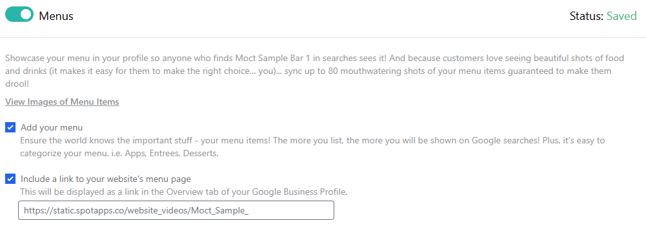
Google allows up to 80 menu photos; if you have uploaded more, only the first 80 will sync.
If you’ve previously added menus directly to Google, any updates made through SpotHopper will overwrite that existing information if you turn on the Menu syncing.
Attributes
Attributes are descriptive tags (similar to keywords) that appear in Google Search and Maps, such as "outdoor seating," "live music," "accepts reservations," "high chairs," or "family-friendly."
These attributes help diners find restaurants and bars that match what they’re looking for — and Google uses them to connect your listing with intent-based searches like "bars with live music" or "brunch spots with high chairs."
SpotHopper makes it easy to update and sync these attributes directly with Google. Simply check the boxes that apply, toggle the section on, and save.
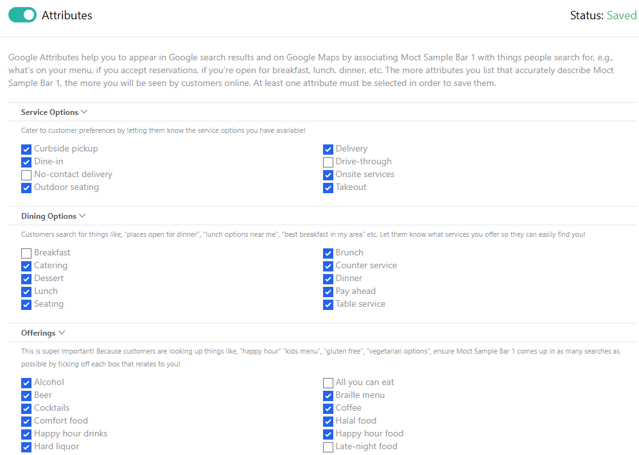
The more relevant attributes you select, the more visible your business becomes in local searches — helping new guests discover you faster.
Best Practices
-
Make SpotHopper your single source of truth for menus and photos — avoid editing these directly in Google once integrated.
-
Keep your attributes and descriptions up to date for maximum discoverability.
-
Avoid making too many edits in one day; Large bursts of changes may be flagged by Google as 'suspicious,' which would prompt Google to take 30 days to verify and approve changes.
-
Check your integration monthly to confirm all desired sections remain toggled on.
- Maintain staying active on your Google Business Profile and start responding to Google Reviews through SpotHopper's platform.
- Reach your highest Google Reviews rating with SpotHopper's ReviewShield.
How many new customers do you think you can gain by appearing higher in Google Local Listings?